
How to scan a paper ticket with LottoBase, step by step
LottoBase Team 29 June 2026 4 min read
If you buy your tickets the traditional way — a slip filled in at the corner shop, a printed ticket folded into a wallet — LottoBase can take that paper ticket and watch it for you. This post walks through scanning a ticket from start to finish: what to do, what the app does next, and why it is worth the ten seconds it takes.
Why scan a ticket at all
A paper ticket only works if you remember to check it. Every week brings the same small chore: dig the ticket out, find the numbers, compare them line by line, and hope you have not misread a 6 for an 8. It is easy to put off, and easy to forget entirely — which is one of the ways prizes go unclaimed.
Scanning hands that chore to the app. Think of it as passing your ticket to an assistant who watches every draw, checks your numbers the moment the results land, and tells you if you have won. You do nothing further; the ticket simply sits in LottoBase, looked after, until there is something worth telling you.
Before you start
The scan reads the QR code printed on your ticket — the small square of black-and-white dots — so the app needs a clear look at it. A well-lit spot helps. If the light is poor, the scanner has a Light On button to switch on your phone’s torch, and a Zoom button to fill the frame with the code. That is all the preparation needed.
Scanning, step by step
The whole flow takes a few seconds:
- From the Games tab or the Tickets tab, tap Scan Ticket.
- The QR scanner opens. Line the ticket’s QR code up within the green corner guides on screen, using Light On or Zoom if you need them. When the code is read, a success ping confirms the scan.
- The ticket appears in your Tickets tab straight away, named automatically, and marked as a Scanned ticket so you can tell at a glance how it got there.
- Its status is set to Tracking for you — there is nothing else to switch on.
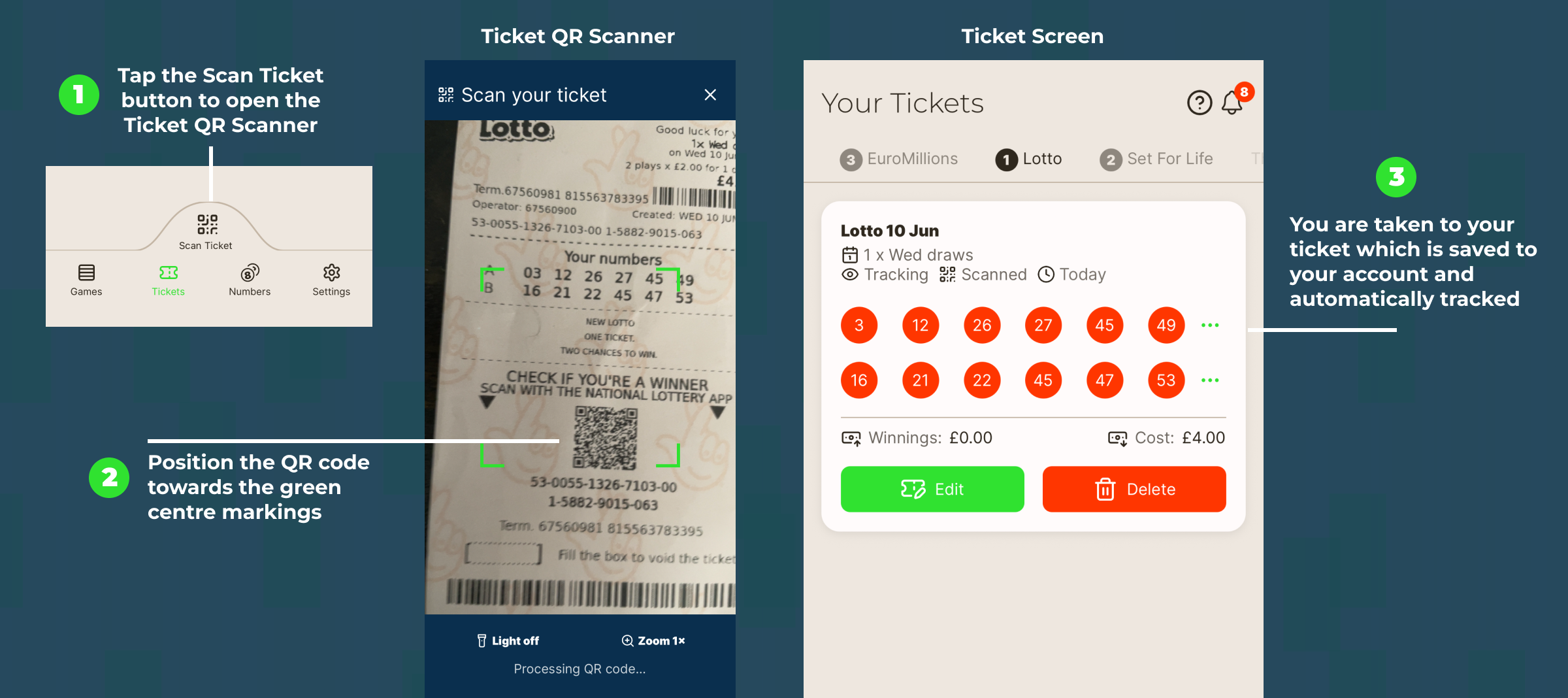
Scan Ticket reads the QR code inside the green corner guides; the ticket lands in Your Tickets, already Tracking.
What “Tracking” means once it is in
Tracking is the part that does the work. A ticket set to Tracking is one the app actively follows: it checks the numbers against every draw the ticket is entered into, records any winning lines, counts down how many draws the ticket has left, and keeps an eye on its expiry. Because the app is now the source of truth for that ticket, its lines are locked and can no longer be edited — which is exactly what you want for a ticket already bought and paid for.
If a line matches a prize tier, LottoBase can alert you within seconds of the draw, rather than days later when you happen to remember. That near-instant check is the heart of the “never miss a win” idea: the result comes to you, not the other way round.
Don’t forget the smaller wins
The dramatic case is the jackpot, but the more common one is a modest win on a ticket you have half-forgotten. National Lottery prizes must be claimed within 180 days of the draw, and a surprising number quietly lapse because nobody got round to it.
For scanned tickets, LottoBase can nudge you. Under Settings → Ticket Reminder Settings, the Claim scanned ticket reminder can prompt you monthly, weekly or daily to claim anything outstanding. Paired with the Winning Ticket Alert, which fires the moment a result comes in, it means a win on a scanned ticket has two chances to reach you — once when it happens, and again until it is claimed.
That’s the whole routine
Scanning is the simplest habit LottoBase asks of you: buy your ticket as you always have, scan the QR code when you get home, and let the app watch it from there. The result is one less thing to remember and one less way for a win to slip past unnoticed.
The lottery is a game of chance, so only ever spend what you can comfortably afford — but if you are going to play, there is little reason to check by hand when the app will do it the instant the balls drop.